

How Sales Tax API Determines Tax Jurisdictions and Rates by Address
If you’ve ever worked with a sales tax API, the process seems straightforward.
You send an address.
The API returns a tax rate.
At a high level, most developers already understand the general idea:
Address → Coordinates → Jurisdiction → Tax Rate
And conceptually, that’s correct.
But once you start working with real-world sales tax systems, it becomes clear that determining tax jurisdictions and rates is not just a simple lookup. It’s a layered geospatial workflow happening behind the scenes.
The Expected Workflow
Most systems are built around a clean mental model:
Address → Coordinates → Polygon → Tax Jurisdiction
The assumption is:
- every jurisdiction has a clearly defined boundary
- one polygon produces one answer
- each address belongs to a single tax area
In simple cases, that works.
But real-world sales tax systems rarely behave that cleanly.
What Happens Inside a Sales Tax API
A production sales tax API typically performs a sequence of steps like this:
Address
→ Address normalization
→ Geocoding (latitude/longitude)
→ Spatial polygon matching
→ Evaluate overlapping jurisdictions
→ Assemble applicable tax jurisdictions
→ Return final tax result
The workflow itself is not especially complicated.
The complexity comes from how many jurisdiction layers may apply to a single address.
Step 1: Address Standardization
Before a jurisdiction lookup can happen, the address usually needs to be standardized.
That may involve:
- correcting formatting
- separating street, city, state, and ZIP code
- normalizing abbreviations
- validating address structure
This helps ensure the geocoding process produces consistent coordinates.
Step 2: Converting the Address Into Coordinates
Once standardized, the address is geocoded into latitude and longitude coordinates.
Those coordinates become the reference point used for spatial jurisdiction matching.
At this stage, the API is no longer working with text — it is working with geographic location.
We’ll cover geocoding accuracy and why coordinate precision matters in more detail in a separate article.
How Sales Tax Jurisdiction Matching Works
This is where the jurisdiction lookup begins.
The system evaluates:
Which jurisdiction polygons contain this coordinate?
And unlike simplified models, the answer is often:
Multiple polygons.
A single address may simultaneously belong to:
- a state jurisdiction
- a county jurisdiction
- a municipality
- multiple special tax districts
All at the same time.
Each of those polygons represents a different taxing authority.
The applicable jurisdiction layers are then combined to determine the final sales tax rate returned for the address.
This is why sales tax determination is often a layered evaluation process rather than a single polygon lookup.
Real-World Example: Overlapping Tax Jurisdictions in Missouri
Consider this address in High Ridge, Missouri:
2700 Ridge Point Dr, High Ridge, MO 63049
This address falls within multiple overlapping taxing jurisdictions:
- Missouri state tax
- Jefferson County tax
- High Ridge Fire Protection District
- Jefferson County Emergency Services District
- High Ridge Commons Community Improvement District
- North Jefferson County Ambulance District
The API must evaluate all applicable jurisdiction layers before assembling the final tax result.
In this case, the total sales tax rate is:
8.35%
Now compare that with another address located only about 2.8 miles away:
4500 Commerce Ave, High Ridge, MO 63049
This second address falls outside the High Ridge Commons Community Improvement District boundary.
As a result, its total sales tax rate is:
7.35%
The difference is entirely driven by one overlapping special district.
If that district boundary is missing from the system, both addresses would return the same tax result — making one of them incorrect.
This is one reason jurisdiction determination cannot rely on simplified geographic assumptions.
The screenshot below shows how a single address can fall within multiple overlapping jurisdiction layers at the same time.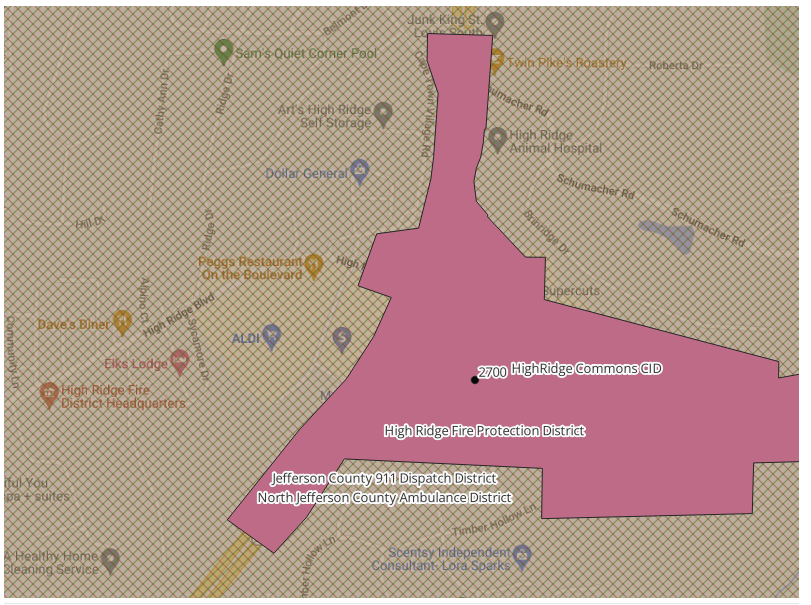
Example of overlapping special district boundaries affecting sales tax jurisdiction determination in High Ridge, Missouri.
Jurisdiction Determination Is a Layered Process
From a system perspective, the workflow often looks like this:
Address
→ Coordinates
→ Match multiple polygons
→ Each polygon represents a jurisdiction
→ Applicable jurisdictions are assembled
→ Final tax determination is returned
The goal is not simply:
Which polygon contains this point?
The real goal is:
Which combination of jurisdictions applies to this address?
That distinction becomes increasingly important in states with extensive special district structures.
Why Different Sales Tax APIs Can Return Different Results
This is also why different sales tax APIs may return different tax results for the same address.
Differences can come from:
- jurisdiction coverage
- special district handling
- spatial matching logic
- geocoding accuracy
- update schedules
- treatment of overlapping districts
Some systems may include certain district layers while others may not.
In many cases, the difference is not the calculation itself — it is the jurisdiction data and spatial evaluation behind the lookup.
A More Practical Approach
After working through these challenges, many teams reach the same conclusion:
The difficult part is not calculating the tax rate.
It is correctly determining all applicable tax jurisdictions behind that rate.
Instead of assembling and maintaining jurisdiction data internally, many teams rely on:
- structured jurisdiction datasets
- pre-built boundary layers
- or sales tax APIs that return jurisdiction-level results
For example, USgeocoder provides layered jurisdiction determination for:
This allows developers and system integrators to focus on application logic rather than maintaining complex jurisdiction mapping systems internally.
Key Takeaway
A sales tax API does much more than return a combined tax rate.
Behind the lookup is a layered geospatial workflow involving:
- address processing
- coordinate matching
- polygon evaluation
- overlapping jurisdictions
- and final jurisdiction assembly
Understanding that process helps explain why jurisdiction determination can become significantly more complex than it first appears.
Related Resources
If you’re working with sales tax jurisdiction data, these may help:
- The Hidden Challenge of Sales Tax Boundary Data (Why Sales Tax Calculations Break)
- Shapefiles for Sales Tax Jurisdictions – Where to Find Reliable Data
- Sales Tax District Shapefiles – Clean, Accurate, Developer-Ready
Final Thoughts
Most sales tax systems appear simple from the outside:
Address in → tax rate out.
Behind that seemingly simple workflow is a layered geospatial process that determines which tax jurisdictions — and ultimately which tax rates — apply to an address.
 The Hidden Challenge of Sales Tax Boundary Data (Why Sales Tax Calculations Break)