

How to Integrate a Sales Tax API into Your ERP or E-commerce Platform
Your ERP or commerce application already handles sales tax calculations. It knows which products are taxable, manages customer exemptions, and generates tax reports. But how does it know which taxing jurisdictions and rates apply to a particular address?
That’s where an address-based sales tax API comes in.
You don’t necessarily need to replace your existing tax system. Instead, you can integrate a geographic tax data provider that identifies the taxing jurisdictions and rates for an address, while your application continues handling taxability, calculations, and reporting.
Here’s how that integration works.
How Does a Sales Tax API Fit into Your Existing Tax System?
Imagine a distributor whose ERP system processes hundreds of invoices each day. Some customers are tax-exempt, while others purchase a mix of taxable and exempt products.
The ERP already handles these decisions. What it needs is reliable geographic tax information when a transaction requires sales tax.
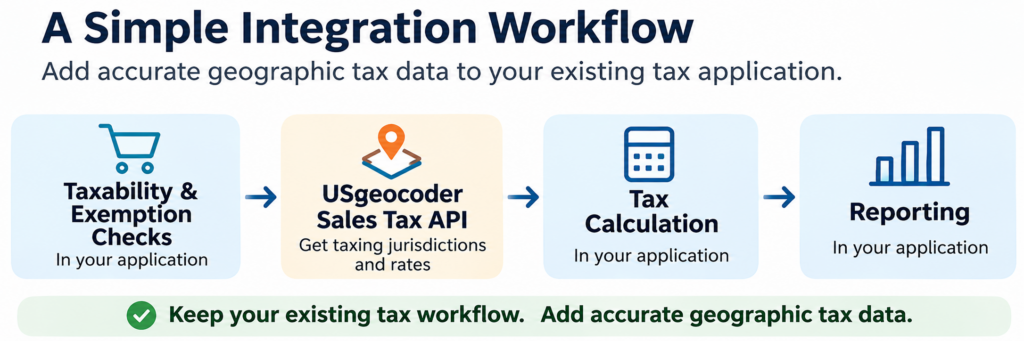
A common integration pattern looks like this:
Transaction → Taxability and exemption checks → Geographic tax API → Tax calculation → Reporting
The application evaluates the transaction and, when geographic rates are needed, sends the appropriate address to the API. It then uses the returned jurisdiction and rate information in its existing tax calculation process.
Some applications need jurisdiction information before completing taxability decisions. The sequence should follow your application’s tax rules rather than assume every transaction works identically.
How to Retrieve Sales Tax Jurisdictions and Rates by Address
Before making an API request, your application must determine which location is relevant to the transaction.
For an online order, that may be the shipping destination. For a distributor, it could be the delivery address on an invoice. The correct location depends on applicable sourcing rules, which remain the responsibility of your tax application.
Once that location is selected, send its complete street address for geographic determination.
Why not use the ZIP code alone? Because postal boundaries don’t necessarily match taxing jurisdiction boundaries. An address with a particular mailing city may fall outside the incorporated city limits, and special taxing districts may cover only part of a ZIP code.
USgeocoder uses address-based geographic determination to identify the applicable state, county, municipality, and special taxing districts, along with their corresponding rates.
For a closer look, see How Sales Tax API Determines Tax Jurisdictions and Rates by Address.
Sales Tax API Request and XML Response Example
USgeocoder’s API accepts an address and ZIP code, or geographic coordinates, and supports XML and JSON output.
For example, a developer can request geographic tax information for 24495 E 35th Drive, Aurora, Colorado 80019:
GET
https://api.usgeocoder.com/api/get_info.php?address=24495%20E%2035TH%20DR&zipcode=80019&authkey=YOUR_AUTH_KEY&format=xml
The authkey identifies the authorized API account, while format=json requests JSON output. XML is also supported.
The following abbreviated XML illustrates the jurisdiction and rate information returned for this address, using a historical USgeocoder example effective January 1, 2023:
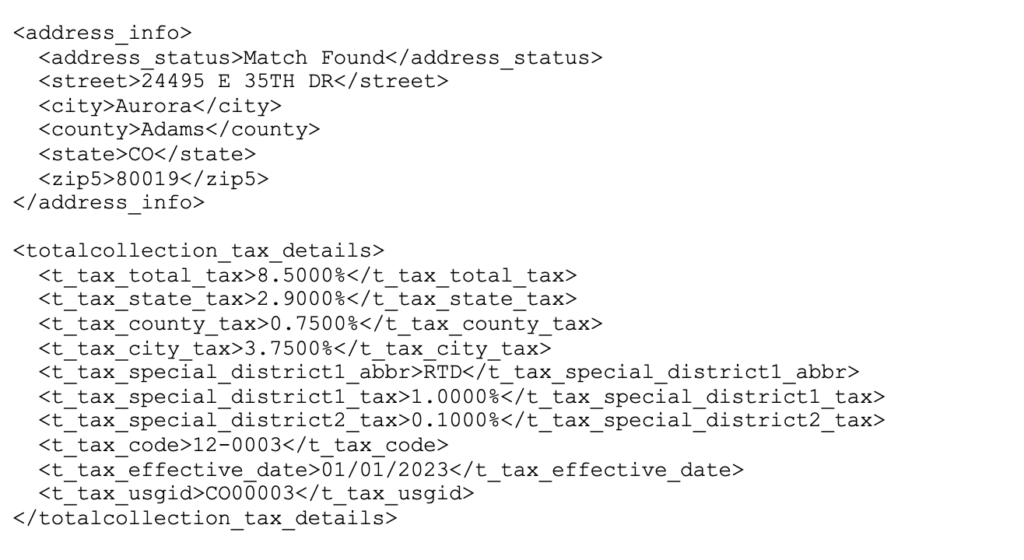
This abbreviated XML shows historical rates, not necessarily today’s rates or the complete live API response.
Notice that the information goes beyond a combined tax rate. It includes individual jurisdiction rates, a state-issued tax code, the rate effective date, and USgeocoder’s geographic identifier, USGID.
The tax code serves a state-specific administrative purpose. USGID identifies a particular combination of taxing jurisdictions within USgeocoder’s data. Both USGID and effective-date fields are also available in the live API response.
You can explore the complete historical example in our Colorado Sales Tax Bulk Address Lookup article.
Using API Tax Rates in Your ERP or E-commerce Application
Now let’s return to the distributor.
Its ERP receives an order, evaluates the products and customer exemption status, and determines that geographic tax information is required.
It sends the delivery address to USgeocoder, checks the lookup status, and reads the returned jurisdiction and rate fields. The ERP maps those values into its internal tax data structure and applies its own rules to calculate the invoice tax.
USgeocoder supplies geographic jurisdiction and rate data; your application determines how to use that information in its tax calculations.
The distributor keeps its existing product classification, exemption handling, invoicing, and reporting processes.
Keeping Geographic Tax Data Accurate
A successful integration also needs to account for changes in addresses, tax rates, and jurisdiction boundaries.
If an address cannot be matched accurately, the application should flag the result rather than assume the ZIP code provides the correct tax rate. Tax rates can also change while the geographic jurisdiction combination remains the same. Boundary changes, however, may require an address to be assigned to a different combination of taxing jurisdictions.
For applications that store geographic tax information, keeping rates and jurisdiction assignments current is an important part of integration.
For high-volume systems, locally hosted rate files or a hybrid architecture may also be worth considering. We explain those options in Sales Tax API vs. Tax Rate Files: Which Is Right for Your Business?.
Keep Your Tax System. Improve Its Geographic Data.
Integrating geographic sales tax information doesn’t have to mean rebuilding your tax application.
By connecting an address-based API to your existing workflow, you can obtain the jurisdiction and rate information your system needs while keeping control of taxability, calculations, exemptions, and reporting.
Explore USgeocoder’s API Integration Guide and Live Demo to see how geographic tax data can fit into your application.
 Sales Tax API vs. Tax Rate Files: Which Is Right for Your Business?